The free punch list app for iPhone
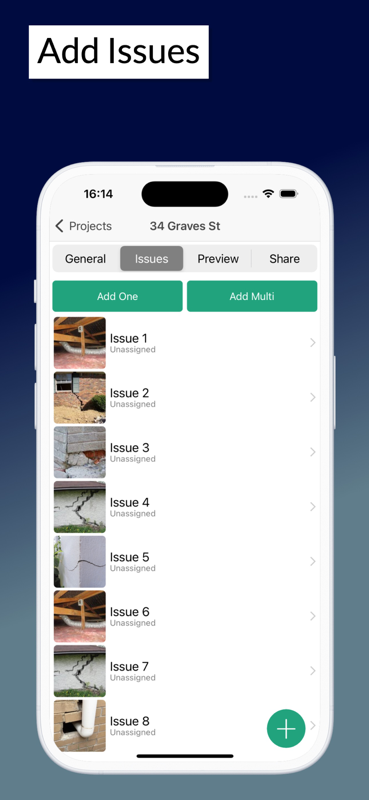
Walk the job with your phone in one hand, log every item with a photo and export a signed PDF before you leave site. SiteAudit runs fully offline on iPhone and iPad, and syncs the moment you get signal back.
- Works offline
- Free to start
- iPhone & iPad
- Signed PDF reports
Everything a punch list needs, on your iPhone
Built for people walking a job, not for people typing up notes afterwards.
No signal, no problem
Basements, plant rooms, lift shafts, rural sites. Create lists, attach photos and close items with no connection at all — everything syncs when you resurface.
Straight from the camera
Attach a photo to any item as you stand in front of it. Nothing to export from Photos afterwards, no filenames to reconcile back at the office.
Signed PDF before you leave
Generate a branded report with every photo and a digital signature, then share it by email or cloud from the phone in your hand.
Assign items to trades
Every item gets an owner, a priority and a due date, then stays tracked through to close-out so nothing quietly disappears.
iPhone and iPad together
Log items on the phone in your pocket, review the whole list on an iPad on the tailgate. Same project, same data, no export step.
Mixed-device teams
Half the team on iPhone and half on Android is normal. Everyone shares one punch list, and the web dashboard covers the office.
From walk-round to shared report
- 1
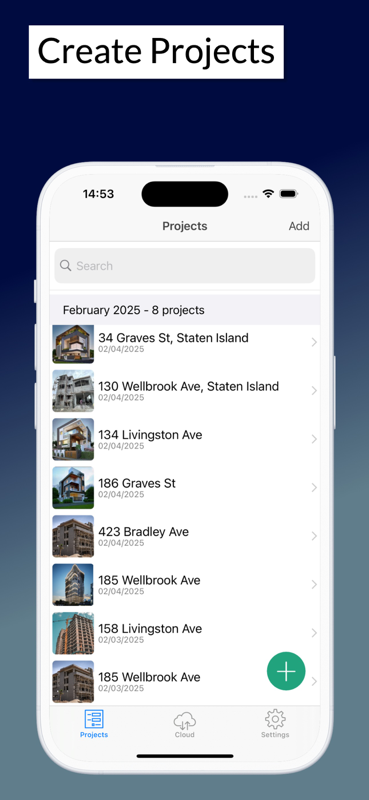
Install from the App Store and start a project
- 2
Walk the site and log each item with a photo
- 3
Assign items to the responsible trade with a due date
- 4
Export a signed PDF and share it before you leave
Start on paper if you prefer
Every template is a free Excel workbook and a print-ready PDF. No email required.
Punch List Template
Track every outstanding item to close-out, with trade, owner, due date and sign-off.
Snag List Template
Room-by-room snagging schedule for new builds and handovers, with responsibility and sign-off.
Punch list guides
Practical guides from the SiteAudit team.
Punch lists on iPhone — common questions
- Is the punch list app free on iPhone?
- Yes — install SiteAudit from the App Store and start building punch lists for free. Paid team plans add extra members, custom templates and advanced reporting.
- Does it work without an internet connection?
- Yes. SiteAudit works fully offline on iPhone and iPad. Create lists, capture photos and close items anywhere, and everything syncs automatically once you are back on signal.
- Does it run on iPad as well as iPhone?
- Yes. The same app runs on iPhone and iPad, so you can log items on a phone and review the full list on a tablet. A companion web dashboard covers the office.
- What iOS version do I need?
- SiteAudit runs on current versions of iOS and iPadOS. The App Store listing shows the exact minimum for your device before you install.
- Can my team use Android while I use an iPhone?
- Yes. SiteAudit runs on iPhone, iPad and Android, and projects sync across all of them, so a mixed-device team works from the same punch list.
- Can I export the punch list as a PDF or spreadsheet?
- You can generate a branded PDF report with photos and digital signatures directly from the app. If you would rather work on paper, the same punch list is available as a free Excel template.
Also see: Punch list app for Android · Punch list app · Download SiteAudit
Start your first punch list today
Free to start on iPhone, iPad and Android. Works offline, exports signed PDF reports and keeps every photo attached to the item it belongs to.


Site Audit is a free construction site audit app for contractors — download the app or see pricing.